

endersaka
Active member
- Messages
- 58
I am not sure this is the right forum for this question, though, I try. Eventually, mods/admins can move kindly to the right place. Thanks.
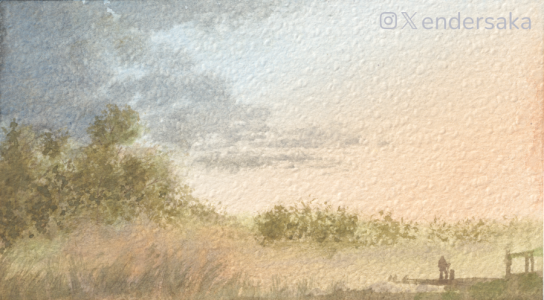
I can't acquire watercolors correctly. Something goes wrong with the scanner. Paper texture is like... "Inverted" (as like as the peaks were the valleys and the valleys were the peaks) and produce a very undesirable effect.
This is an example. A small marshland landscape. Where you see a "hill" there is actually a "depression", and vice-versa. Which, in this case, does not cause particular problems, but it does for darker paintings.
Therefore, I thought to capture my paintings with the camera, and to achieve bigger resolution, to capture overlapping quadrants, and mount them as a mosaic, with some software that I found, named hugin. The software is pretty straight forward, also I come from photogrammetry experience, so I see similarities, though, I wonder, does anyone have any experience in taking the photographs for such kind of programs?
I can't acquire watercolors correctly. Something goes wrong with the scanner. Paper texture is like... "Inverted" (as like as the peaks were the valleys and the valleys were the peaks) and produce a very undesirable effect.
This is an example. A small marshland landscape. Where you see a "hill" there is actually a "depression", and vice-versa. Which, in this case, does not cause particular problems, but it does for darker paintings.
Therefore, I thought to capture my paintings with the camera, and to achieve bigger resolution, to capture overlapping quadrants, and mount them as a mosaic, with some software that I found, named hugin. The software is pretty straight forward, also I come from photogrammetry experience, so I see similarities, though, I wonder, does anyone have any experience in taking the photographs for such kind of programs?


