
Photographing Paintings Help

endersaka

Active member
Messages
10
I am not sure this is the right forum for this question, though, I try. Eventually, mods/admins can move kindly to the right place. Thanks.

I can't acquire watercolors correctly. Something goes wrong with the scanner. Paper texture is like... "Inverted" (as like as the peaks were the valleys and the valleys were the peaks) and produce a very undesirable effect.

This is an example. A small marshland landscape. Where you see a "hill" there is actually a "depression", and vice-versa. Which, in this case, does not cause particular problems, but it does for darker paintings.

Therefore, I thought to capture my paintings with the camera, and to achieve bigger resolution, to capture overlapping quadrants, and mount them as a mosaic, with some software that I found, named hugin. The software is pretty straight forward, also I come from photogrammetry experience, so I see similarities, though, I wonder, does anyone have any experience in taking the photographs for such kind of programs?
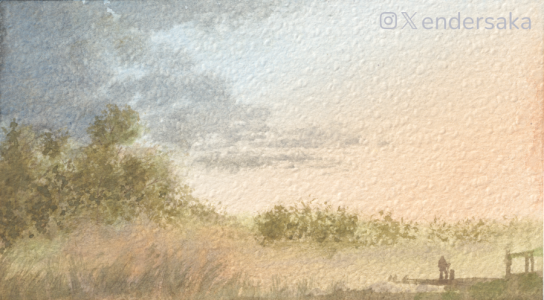
IMG_0001_instagram.png
 
I think what you're responding to is a common optical illusion. How the brain interprets light and shadow and translates it into a 3D model. Nothing wrong with that photo that I can see, and it's a nice WC besides.
 
I think what you're responding to is a common optical illusion. How the brain interprets light and shadow and translates it into a 3D model. Nothing wrong with that photo that I can see, and it's a nice WC besides.
I appreciate your positive feedback but, believe me, it is not an optical illusion, what I see with my very eyes is different and the rendition of that painting is totally different.
 
No comparison of a photo of a painting and a painting. I find you lose the color harmonies as they get moulded in the process. As for the dimples I don’t know as I’ve never took a photo of watercolour paper.
 
No comparison of a photo of a painting and a painting. I find you lose the color harmonies as they get moulded in the process. As for the dimples I don’t know as I’ve never took a photo of watercolour paper.
I totally agree. Though we need to show our work sometime even in digital or print medium, it is not always possible to bring the audience to see it live. So, my goal is to get as close as possible to what is seen with the very eyes. While the colors are pretty well rendered, the dimples are flipped inside-out. I was thinking about that in the past hours, and I believe might have found an explanation. Though I do not have the solution with the scanner, but I know that photos "respect the dimples", from which I derived the idea of the photomosaic, in order to capture a painting at a high resolution with a modest camera.
 
Not sure if you been this route but Cht AI has this to say.
What you’re seeing is a common visual illusion caused by lighting and how cameras interpret surface texture.

Why the “dimples reverse”​

Watercolor paper has a textured surface (often called “tooth”). When you photograph it:
  • Directional lighting creates highlights on one side of each bump and shadows on the other.
  • Your brain assumes light is coming from above (a built-in perception bias).
  • If the actual light direction in the photo doesn’t match that assumption, bumps can look like dents, or dents like bumps—this is called a shape-from-shading illusion.
  • Cameras can exaggerate this by increasing contrast or sharpening texture.
So the paper isn’t changing—your brain is misinterpreting the light cues.

How to fix it​

1. Use even, diffuse lighting (best fix)

Shoot in soft daylight (cloudy day or near a window with a sheer curtain).
  • Or use two lights at equal angles on both sides.
  • Avoid a single harsh light source from one side.

2. Change light direction

  • Move the light so it comes more from above (matching your brain’s expectation).
  • Even rotating the painting 180° can make the dimples “flip” back visually.

3. Reduce shadows

  • Use a light tent, diffuser, or bounce light off a white wall/foam board.
  • The goal is to minimize micro-shadows in the paper texture.

4. Adjust camera settings

  • Lower contrast and sharpness.
  • Slightly overexpose (just a bit) to soften texture visibility.

5. Post-processing

  • Reduce clarity/texture sliders (in apps like Lightroom).
  • Slightly lift shadows and reduce micro-contrast.
 
Not sure if you been this route but Cht AI has this to say.

[...]

Yep, it is a yes and no at the same time. Shadows and highlights can cause optical illusions, of course they do.

Though, first of all, we have to clarify that:
  • The image I shared above, is acquired with a scanner, not a camera.
  • With a scanner you cannot control the distribution of light.
About distribution of light (with a camera, this time, not scanner):
  • With camera I get the correct effect.
  • No matter where light comes from. I tried many different lighting conditions: it always works.
  • The "elevation map" suggested by shadows looks inverted only when I capture the painting with a scanner.
 
An update. Accordingly, to some source I found, scanners lighten the source with a directional light (one single direction) that can produce this illusion (probably because nearly impossible to witness in natural conditions) and to fix it, they use to scan the watercolor paintings twice, the first in one direction and the second rotating the source by 180°. Then they compose the two images in an image editor. The flipped shadows of the 180° version, help to minimize the impossible shadows of the first scan.

The biggest problem for me in this case is to perfectly align the two scans.
 
Ambient Occlusion

Another update... I think I understood what scanners "kill": ambient occlusion. Since they capture a small strip for each step, illuminated from a single direction (left or right, I guess) and then combine all the acquired strips into a single image, it looks like the combined source is illuminated by a perfect (impossible in nature) directional, parallel rays, source of light from (for example) left with ambient occlusion (which give us the sense of depth) basically nullified.

A camera, on the contrary, is taking a physically natural lightened source, where ambient occlusion is always present, no matter what direction the light come from.
 
...

The biggest problem for me in this case is to perfectly align the two scans.

You could try focus stacking with automatic alignment.

Taking photos for web sites is a topic that interests me greatly. A question about the image you posted above: did you adjust the tone curves to get a centred curve? I played with it and adjusted the tone curve to get this:

Tone Curve.jpg


IMG_0001_instagram.jpg


I would be interested to hear whether is is a better representation of the painting.
 
Back
Top