
You are using an out of date browser. It may not display this or other websites correctly.
You should upgrade or use an alternative browser.
You should upgrade or use an alternative browser.
Scavenger Hunt from Life #179: Dec 28 - Jan 9, 2026
- Thread starter Jo Castillo
- Start date

Jo Castillo
Well-known member
- Messages
- 5,056
Joan, great pinnacle sketch. Fun to find the items. You have done a lot.
Hi Ai, Fletch, Robin, Pine Cone, Jade and other lurkers.
We have had a few days of spring or early summer. Warm and humid but no rain. We did accomplish something, errands and mailing items.
Hi Ai, Fletch, Robin, Pine Cone, Jade and other lurkers.
We have had a few days of spring or early summer. Warm and humid but no rain. We did accomplish something, errands and mailing items.

Joan T
Well-known member
- Messages
- 2,309
Jo, I spoke to our friend in Itasca and she said it was really hot there today. Glad you got out to do some errands.
Fletch, love your Naval insignia! Great job on the details.
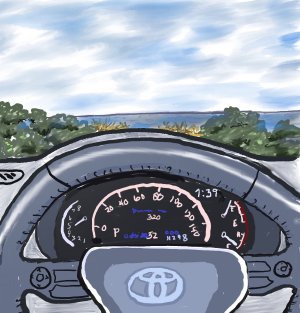
Sat in my car at the beach to do this. I did it in layers in Procreate and then couldn't get the layers to merge. Grrr... I had to redo parts of it.
18 - odometer - Procreate
Fletch, love your Naval insignia! Great job on the details.
Sat in my car at the beach to do this. I did it in layers in Procreate and then couldn't get the layers to merge. Grrr... I had to redo parts of it.
18 - odometer - Procreate
Jo Castillo
Well-known member
- Messages
- 5,056
Fletch, ahhh, love the emblem. Very special and well done for a quick sketch. Thanks for doing that emblem.
Joan, looks like you did great with Procreate on the odometer. I have tried layers in Photoshop Elements but not in my drawing apps. I'm too lazy to learn new stuff. Ha. I like the scene in front of your car, too!
I thought about sketching a lot today ..... didn't get any done. Evil grin.
Joan, looks like you did great with Procreate on the odometer. I have tried layers in Photoshop Elements but not in my drawing apps. I'm too lazy to learn new stuff. Ha. I like the scene in front of your car, too!
I thought about sketching a lot today ..... didn't get any done. Evil grin.

AiArts
Well-known member
- Messages
- 2,948
Fletch: Awesome drawing of your USN emblem. It looks tricky, esp. the chain part.. I wish I was near my father. He had been with the Thai Army, and had been to Vietnam war (under Uncle's Sam hiring)... later he was briefly trained at Fort Bragg, NC. in around 1972. He retired as a General; he must have had several of army emblems for me to draw.
Joan: Welldone digi with Procreate. You learn well so much of layers despite you had a hic-up with it. I never try layers... I hope one day I have more time to explore more digi. The depth is great with distance clouds.
Hello all: I have been busy with works... never get around to do arts in the past couple days... but I do hope to get around to it.
Joan: Welldone digi with Procreate. You learn well so much of layers despite you had a hic-up with it. I never try layers... I hope one day I have more time to explore more digi. The depth is great with distance clouds.
Hello all: I have been busy with works... never get around to do arts in the past couple days... but I do hope to get around to it.

jmfletch
Well-known member
- Messages
- 1,469
Thanks to all for kind supportive comments.
Joan - am pretty sure when you export to .jpg that collapse the layers in that new version but original will stay layered. But to merge layers in your drawing I know 2 ways 1) pinch the layer names together 2) tap on layer name get menu and tap merge down. Pine Cone is the pro so probably has more or better ways. Either way your drawing is great. Highlight on the wheel and super job on sky and trees. Plus details on the dash
Ai - your work is missed. Does not matter what country, you do not get to be a general without having earned many emblems and medals. Would be interesting to see some of you father’s awards.
Jo, Jade, Ned, Pine Cone, Robin and lurkers
Keep sketching and learning
Fletch
Joan - am pretty sure when you export to .jpg that collapse the layers in that new version but original will stay layered. But to merge layers in your drawing I know 2 ways 1) pinch the layer names together 2) tap on layer name get menu and tap merge down. Pine Cone is the pro so probably has more or better ways. Either way your drawing is great. Highlight on the wheel and super job on sky and trees. Plus details on the dash
Ai - your work is missed. Does not matter what country, you do not get to be a general without having earned many emblems and medals.
Would be interesting to see some of you father’s awards.Jo, Jade, Ned, Pine Cone, Robin and lurkers
Keep sketching and learning
Fletch
Hi everyone  Thank you all so much for your kind words, healing vibes, and meaningful encouragement

JoC — Thanks for hosting this event and the one before too Very cool list, and I learned some new words
  And wow, that purple doodad is stellar - what an amazing sketch of a mysterious item
  Enjoying your finger painting sketch of the stores across the way
  Artful four roses bottle, and beautifully sketched whistles, with depth and volume - so well-loved, and never abandoned
Ai — Your sketch of your dh giving blood is very, very special Thank you for your positive merit vibe - it means a lot Your cosy sourdough cafe, with a Happy Santa outside
  is a comforting and gentle painting
  Thank you!!!
All your scenes have a happy feel to them… from your Santa to the sunflowers… to the canal… to the fantastic light and grace of your suspension bridge painting and the mystical, enchanted background behind the waiting ships 
I hope Iris has fun with her art workshop course - what a thoughtful gift!!!
Be sure to get the rest you need now that you’re back to work
Robin – I’d never heard of that kind of quilt - very cool - and your wonderful sketch of the supplies is beautiful lovely sketches from the kitchen in warm, earthy tones I agree with everyone that we need to see the quilt as you go along
  Lovely way to give that squashed bow a new and useful life What a cool newsprint tablet cover
Fletch — Terrific sketches of your washing machine and transparent bag - I’ve been coming back to study how you achieved such excellent tramsparency, WOW And love the recorder piece with its fantastic contrast

Poignant sketch of your USN insignia - the contrast between the bold lines of the main piece, and the gentle drape of the chain through it all, really got to me
LOL, have to agree with you that “still recovering and sitting in cold getting wet is not the brightest move.” lololololol
Thanks for your comments on the special nature of color in our efforts, and about choosing the right ***temperature.*** I’m taking notes, because I think that choosing the right temperature would help my re-learning to draw sketches….. I’ve been stumbling around in the dark in that aspect I think….. I’ve been working on a color sketch for more than a week lol, and I’m really struggling to get the result I want, but now, maybe I see a happy path forward for it, by thinking in terms of color temperature???
Joan — Each of your gorgeous winter scenes has its own flavor and beauty
Also, lovely use of the sketch&wash pencil, and heart-breakingly delicious (and festive) plate of cookies
Wonderful sketches of buildings and establishments, with fantastic details to explore and enjoy (and make me hungry again)
Also enjoying your sketches of simple pleasures like the Ziplocs (with JoC’s red and blue stripes), kitchen stuff, etc.
Joan and Fletch — About Joan’s super fun layered Procreate sketch, Fletch’s comments were exactly right. Being able to merge layers has its uses, but exporting does NOT require you to do so. If you want more detailed info, you can check the Procreate handbook on their website, or message me.
Jade — Thanks so much for your well wishes, and I’m so glad you and Bob are still here on the thread

 He is so kind and handsome and noble Thank him for sharing you with us
joe1lt — happy new year to you too ! I know you’re busy, but I miss your sketches, and hope Eeyore and friends are okay
Thank you all so much for your kind words, healing vibes, and meaningful encouragement JoC — Thanks for hosting this event and the one before too
Very cool list, and I learned some new words And wow, that purple doodad is stellar - what an amazing sketch of a mysterious item Enjoying your finger painting sketch of the stores across the way Artful four roses bottle, and beautifully sketched whistles, with depth and volume - so well-loved, and never abandoned Ai — Your sketch of your dh giving blood is very, very special
Thank you for your positive merit vibe - it means a lot Your cosy sourdough cafe, with a Happy Santa outside is a comforting and gentle painting Thank you!!!All your scenes have a happy feel to them… from your Santa to the sunflowers… to the canal… to the fantastic light and grace of your suspension bridge painting
and the mystical, enchanted background behind the waiting ships I hope Iris has fun with her art workshop course - what a thoughtful gift!!!
Be sure to get the rest you need now that you’re back to work
Robin – I’d never heard of that kind of quilt - very cool - and your wonderful sketch of the supplies is beautiful
lovely sketches from the kitchen in warm, earthy tones I agree with everyone that we need to see the quilt as you go along Lovely way to give that squashed bow a new and useful life What a cool newsprint tablet cover Fletch — Terrific sketches of your washing machine and transparent bag - I’ve been coming back to study how you achieved such excellent tramsparency, WOW
And love the recorder piece with its fantastic contrast Poignant sketch of your USN insignia - the contrast between the bold lines of the main piece, and the gentle drape of the chain through it all, really got to me
LOL, have to agree with you that “still recovering and sitting in cold getting wet is not the brightest move.” lololololol
Thanks for your comments on the special nature of color in our efforts, and about choosing the right ***temperature.*** I’m taking notes, because I think that choosing the right temperature would help my re-learning to draw sketches….. I’ve been stumbling around in the dark in that aspect I think….. I’ve been working on a color sketch for more than a week lol, and I’m really struggling to get the result I want, but now, maybe I see a happy path forward for it, by thinking in terms of color temperature???
Joan — Each of your gorgeous winter scenes has its own flavor and beauty
Also, lovely use of the sketch&wash pencil, and heart-breakingly delicious (and festive) plate of cookies
Wonderful sketches of buildings and establishments, with fantastic details to explore and enjoy (and make me hungry again
)Also enjoying your sketches of simple pleasures like the Ziplocs (with JoC’s red and blue stripes), kitchen stuff, etc.
Joan and Fletch — About Joan’s super fun layered Procreate sketch, Fletch’s comments were exactly right. Being able to merge layers has its uses, but exporting does NOT require you to do so. If you want more detailed info, you can check the Procreate handbook on their website, or message me.
Jade — Thanks so much for your well wishes, and I’m so glad you and Bob are still here on the thread
He is so kind and handsome and noble Thank him for sharing you with us joe1lt — happy new year to you too ! I know you’re busy, but I miss your sketches, and hope Eeyore and friends are okay
Last edited:
Joan T
Well-known member
- Messages
- 2,309
Jo, thanks. I hate when I do something on Procreate and then lose it before I finish. I really have to learn how to use layers correctly...but I'm too lazy to spend the time learning it before I need it. And then it is too late.
Fletch, thanks for your comment and your suggestions. I had looked on my phone for how to merge them and tried pinching the layers, but obviously didn't do it right. I'll have to play around with it when I'm not actually working on a sketch I need to keep. lol
Pine Cone, once again thanks for all your comments on my work. My problem with Procreate is I never devoted much time to learning the program. Like always I expect to dive right in and that it will come to me. lol I've learned a lot using it, but have no instructions to follow so sometimes I'm flying by the seat of my pants. I'll have to check out their handbook which so far I haven't used at all. I know there are lessons on youTube, but I'm usually in the middle of doing something when I find I have a problem.
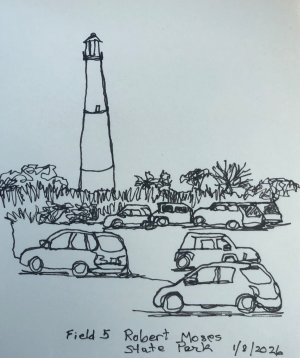
Here is a bonus pinnacle continuous line sketch. I went down to the ocean for the first time this year. I usually try to get there on New Year's Day, but this year I wasn't feeling great and it was freezing cold, so I decided to skip going. Today the temperature was about 50° and not too windy so I enjoyed sketching there. I sat in my mobile studio with the windows partly open. I even took a short walk on the boardwalk.
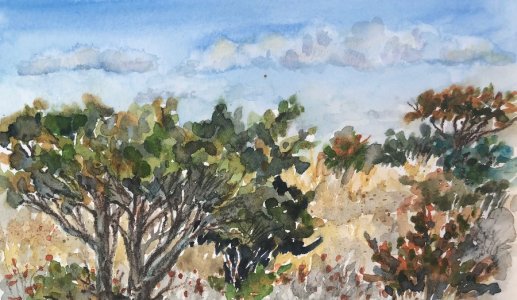
19 - beach shrubs (sub for youpon) - watercolors
Fletch, thanks for your comment and your suggestions. I had looked on my phone for how to merge them and tried pinching the layers, but obviously didn't do it right. I'll have to play around with it when I'm not actually working on a sketch I need to keep. lol
Pine Cone, once again thanks for all your comments on my work. My problem with Procreate is I never devoted much time to learning the program. Like always I expect to dive right in and that it will come to me. lol I've learned a lot using it, but have no instructions to follow so sometimes I'm flying by the seat of my pants. I'll have to check out their handbook which so far I haven't used at all. I know there are lessons on youTube, but I'm usually in the middle of doing something when I find I have a problem.
Here is a bonus pinnacle continuous line sketch. I went down to the ocean for the first time this year. I usually try to get there on New Year's Day, but this year I wasn't feeling great and it was freezing cold, so I decided to skip going. Today the temperature was about 50° and not too windy so I enjoyed sketching there. I sat in my mobile studio with the windows partly open. I even took a short walk on the boardwalk.
19 - beach shrubs (sub for youpon) - watercolors
Joan — Wow, sounds like you had fun at the beach today I love your fun sketch from there, and your watercolor is alive and welcoming with color and depth
—————————-
I understand about Procreate. It has a lot to offer, but it doesn’t always announce itself very well, at first glance.
Here’s a fun and easy thing to try. It will open up all kinds of possibilities for you……
……. Using an image with several layers already created, go to your layers “palette” (layers list).
……. Tap on a layer.
……. Off to the left of the list, a bunch of options will magically appear.
……. Those options represent possibilities for things that can be done “with” or “to” that layer.
—————————-
Below is a screenshot of my “Canvas Information” for a Procreate piece I’ve been working on.
NOTE: The piece is NOT an art creation, but rather a page with a collage and a bunch of notes. I find it easier to do notes that way because I can order and arrange layers in Procreate far easier than in any “notes” app.
As you can see, I have a zillion layers in this one Procreate piece.
When I get done, I can export the piece as a PDF page right into a note in my “notes” app!!!
***** But the point is, you can use layers, lots of them (if you have enough memory).
And they will make you happy

I love your fun sketch from there, and your watercolor is alive and welcoming with color and depth —————————-
I understand about Procreate. It has a lot to offer, but it doesn’t always announce itself very well, at first glance.
Here’s a fun and easy thing to try. It will open up all kinds of possibilities for you……
……. Using an image with several layers already created, go to your layers “palette” (layers list).
……. Tap on a layer.
……. Off to the left of the list, a bunch of options will magically appear.
……. Those options represent possibilities for things that can be done “with” or “to” that layer.
—————————-
Below is a screenshot of my “Canvas Information” for a Procreate piece I’ve been working on.
NOTE: The piece is NOT an art creation, but rather a page with a collage and a bunch of notes. I find it easier to do notes that way because I can order and arrange layers in Procreate far easier than in any “notes” app.
As you can see, I have a zillion layers in this one Procreate piece.
When I get done, I can export the piece as a PDF page right into a note in my “notes” app!!!
***** But the point is, you can use layers, lots of them (if you have enough memory).
And they will make you happy
AiArts
Well-known member
- Messages
- 2,948
Joan: Glad you get to visit the beach, even a few days after the new year. Fantastic continuous lines of the lighthouse and cars. Beautiful wc work of shrubs.
Fletch: If I visit my father again, I will ask if I could see some of his army emblems. I remember from my childhood that I saw one with the parachute sign on it.
PineCone: Thanks for your kind words.
Fletch: If I visit my father again, I will ask if I could see some of his army emblems. I remember from my childhood that I saw one with the parachute sign on it.
PineCone: Thanks for your kind words.

Robin Gillis
Contributing Member
- Messages
- 766
Posted the next hunt
Joan T
Well-known member
- Messages
- 2,309
Pine Cone, thanks. I will have to try what you suggested.
Ai, thanks so much. I usually go to the beach on New Year's Day and it is fun to see all the families and extended families that come out in the cold to do the same thing. Most of the time I take the mile walk to the lighthouse. They serve hot chocolate and cookies to everyone to welcome the new year. A lot of the people actually hang out on the beach on blankets in their warm winter clothing. They picnic and play games. Some hang around in the parking lot tailgating with friends. I missed doing that this year.
Robin, thanks. I'm going to go print out the new list.
Ai, thanks so much. I usually go to the beach on New Year's Day and it is fun to see all the families and extended families that come out in the cold to do the same thing. Most of the time I take the mile walk to the lighthouse. They serve hot chocolate and cookies to everyone to welcome the new year. A lot of the people actually hang out on the beach on blankets in their warm winter clothing. They picnic and play games. Some hang around in the parking lot tailgating with friends. I missed doing that this year.
Robin, thanks. I'm going to go print out the new list.
Coincidentally, I just had a question about layer options myself, and discovered that there is a new version of the Procreate Handbook available…..

 help.procreate.com
And the page that has Layer Options is here. Scroll down for more about the “Merge Down” option that Fletch described earlier…..
help.procreate.com
Introduction — Procreate Handbook
Learn everything you need to know about Procreate in the official user guide.
help.procreate.com
And the page that has Layer Options is here. Scroll down for more about the “Merge Down” option that Fletch described earlier…..
Options — Procreate Handbook
Rename, Select, Copy, Fill and Clear. Master powerful Alpha, Mask, Reference and Merge functions through the Layer Options menu.
help.procreate.com
2 - “cupcake” — i hate ellipses
associations:
….. cupcake
…….. food
……….. nutrition
………….. protein
…………….. protein shake bottle
— virtual sketch
— freehand
— iPad Pro and Apple pencil
— Procreate app
— My Re-Learning to Draw Program - review Phase 1 (lines, circles, and ellipses)
———————————
Been practicing ellipses for over a week, trying to do a sketch (not this one lol).
Need to practice ellipses.
Must practice ellipses.
I hate ellipses.

associations:
….. cupcake
…….. food
……….. nutrition
………….. protein
…………….. protein shake bottle
— virtual sketch
— freehand
— iPad Pro and Apple pencil
— Procreate app
— My Re-Learning to Draw Program - review Phase 1 (lines, circles, and ellipses)
———————————
Been practicing ellipses for over a week, trying to do a sketch (not this one lol).
Need to practice ellipses.
Must practice ellipses.
I hate ellipses.
Joan T
Well-known member
- Messages
- 2,309
Pine Cone, thanks for the info...will check it out. I love how your association went from cupcake to protein shake bottle. lol I hate ellipses too...again, I'm not patient enough when I do them. I know there are ways to do them so they come out nearly perfect, but I like to do things freehand. I know that you like doing that in Procreate too.
Thanks Joan — I forgot to say that my protein bottle was continuous line. And I bow my head before you, looking back at your impossible continuous line sketch at the beach on this page. How do you do it??? Six or seven cars, a tall building, and an entire row of foliage, and I didn’t even realize it was continuous line until the second read lol. Terrific inspiration, but impossible for me to realistically aspire to 2b - “cupcake” - try 2(000) …… i still hate ellipses
associations:
….. cupcake
…….. food
……….. nutrition
………….. protein
…………….. protein shake bottle
— virtual sketch
— freehand
— iPad Pro and Apple pencil
— Procreate app
— My Re-Learning to Draw Program - review Phase 1 (lines, circles, and ellipses)
———————————
As before, this is continuous line, and therefore, for me, impossible
———————————
Decided to try again…..
Decided to do some more painting on the background to tone it down.
Decided to try a virtual pencil rather than a v.pen.
Didn’t help


associations:
….. cupcake
…….. food
……….. nutrition
………….. protein
…………….. protein shake bottle
— virtual sketch
— freehand
— iPad Pro and Apple pencil
— Procreate app
— My Re-Learning to Draw Program - review Phase 1 (lines, circles, and ellipses)
———————————
As before, this is continuous line, and therefore, for me, impossible
———————————
Decided to try again…..
Decided to do some more painting on the background to tone it down.
Decided to try a virtual pencil rather than a v.pen.
Didn’t help
Joan T
Well-known member
- Messages
- 2,309
Pine Cone, you are persistent. You lines are so neat in the continuous line. I tend to go over some spots more than once.
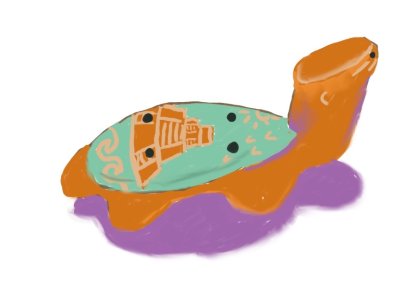
I kept thinking about my turtle ocarina so I dug through the draw where I keep it. He was well hidden so I cleaned out the drawer while I was digging in there.
20 - kazoo-like ocarina - Procreate
I kept thinking about my turtle ocarina so I dug through the draw where I keep it. He was well hidden so I cleaned out the drawer while I was digging in there.
20 - kazoo-like ocarina - Procreate
Jo Castillo
Well-known member
- Messages
- 5,056
Pine Cone, thanks, love all your comments. I never study digital stuff. Too lazy but appreciate all your info. Some may stick in my old brain after reading it. Ha. Thanks. Your association made me laugh from sugar to protein. So fun. Your bottle is pretty good. Especially with the continuing line. I like the background in the second and you did better on the lines. Kudos for practicing.
Joan, the continuous line of the light house and cars is amazing and detailed. I like the youpon sub of the bushes. Very nice.Your ocarina is very cute. Love the colors.
I didn't get anymore done. Just lazy I think. I did word puzzles at PT and then nothing.
Thanks everyone for all the fun. See you on the next Hunt.
Joan, the continuous line of the light house and cars is amazing and detailed. I like the youpon sub of the bushes. Very nice.Your ocarina is very cute. Love the colors.
I didn't get anymore done. Just lazy I think. I did word puzzles at PT and then nothing.
Thanks everyone for all the fun. See you on the next Hunt.
Similar threads

- Replies
- 67
- Views
- 958

- Replies
- 85
- Views
- 1K

- Replies
- 58
- Views
- 2K
- Replies
- 113
- Views
- 2K

- Replies
- 86
- Views
- 2K